

EXTENDING AN EXISTING DESIGNMyPlace4Parts
A full design cycle with generative and evaluative research to extend AAPA’s customer base to include heavy-duty auto parts stores and shops.
ROLEDesign & Research
TIMELINE2 Months
DELIVERABLEHi-Fidelity Prototype
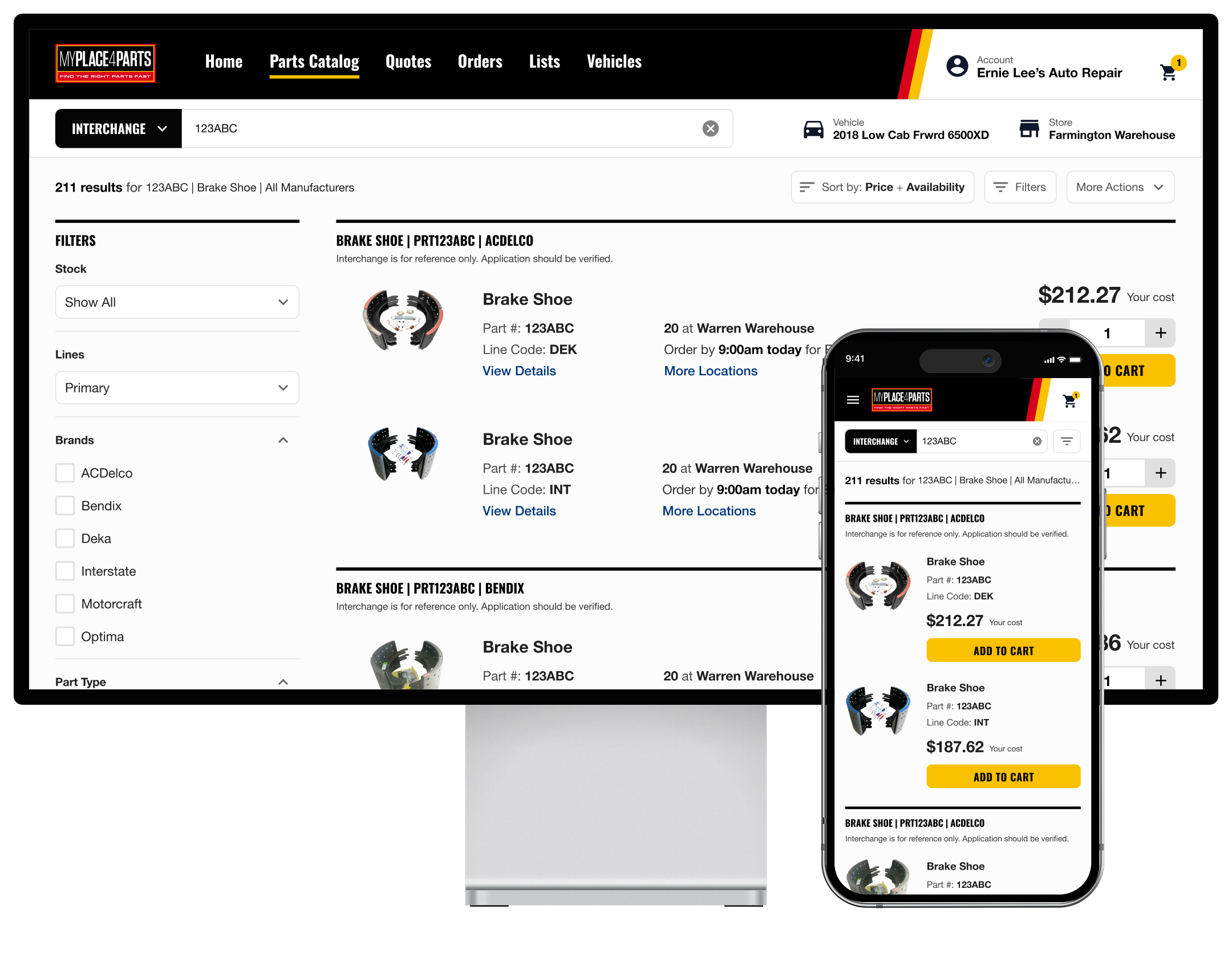
Overview
AAPA sells aftermarket auto parts, and their B2B platform MyPlace4Parts (MP4P) is one of many places mechanics turn to when sourcing parts—whether to complete repair jobs in their shops or to stock their stores. Most of AAPA's customers buy for light and medium-duty vehicles: the everyday Toyota Corollas, Honda Accords, and Ford F-150s.
But AAPA saw a large slice of the market they weren't reaching — shops and stores that service heavy-duty vehicles like semi-trucks, motor homes, and fire trucks. To capture it, they asked us to run a full design cycle, with both generative and evaluative research. I partnered with a second designer through the research and initial design, then carried the project through delivery on my own.
Process
01
Discovery
Facilitated discovery work with client stakeholders, conducted contextual inquiry interviews with heavy-duty customers, and completed a competitive analysis.
02
Design
Created a task flow and hi-fi prototype demonstrating new functionality. Gathered and incorporated client feedback across multiple structured review sessions.
03
Evaluative Research
Conducted usability testing to validate the designs. Identified where the experience was working well and surfaced key issues to address, then implemented user feedback.
Discovery
AAPA knew they had blind spots in the heavy-duty space. Before designing anything, we needed to understand how these customers actually shop for parts — and where MP4P was falling short for them. We started by meeting several times with the client to align on goals and absorb what they already knew.
Next we went straight to the users: 5 contextual-inquiry interviews with current MP4P customers, followed by a competitive analysis of 8 other sites they named as places they shop. Through this discovery work, a clear picture emerged.
01
Users start from a part number
Unlike light and medium-duty customers who add a vehicle, then browse the catalog or searching by keyword for fitting parts, heavy-duty customers almost always begin by searching for a specific part number.
02
Interchange search is standard
Every participant leaned heavily on interchange search — a specialized search tool that takes a part number and surfaces interchangeable parts from other manufacturers. MP4P's version wasn't up to par with the competitors.
03
Search results were hard to parse
Different manufacturers reuse the same part number for completely different components. Searching part #123ABC could return brake shoes, chassis parts, exhaust gaskets, and ignition coils all at once, forcing users to wade through irrelevant results to find the right part to interchange.
04
Wasted time is costly
For shop owners, downtime means lost revenue. For mechanics that service emergency vehicles, it can mean taking critical vehicles out of service and putting community safety at risk. Our users needed to find the right part quickly, as every extra second spent searching came at a cost.
Design
The good news was that MP4P’s existing interchange search experience didn’t need a complete overhaul. Instead, we focused on improving how search results were presented so users could find the right part faster.
With interchange search identified as our primary opportunity, we moved into design—building a task flow and prototypes to demonstrate the new experience, and refining them with the AAPA team across three review sessions.
Two enhancements did the heavy lifting:
01
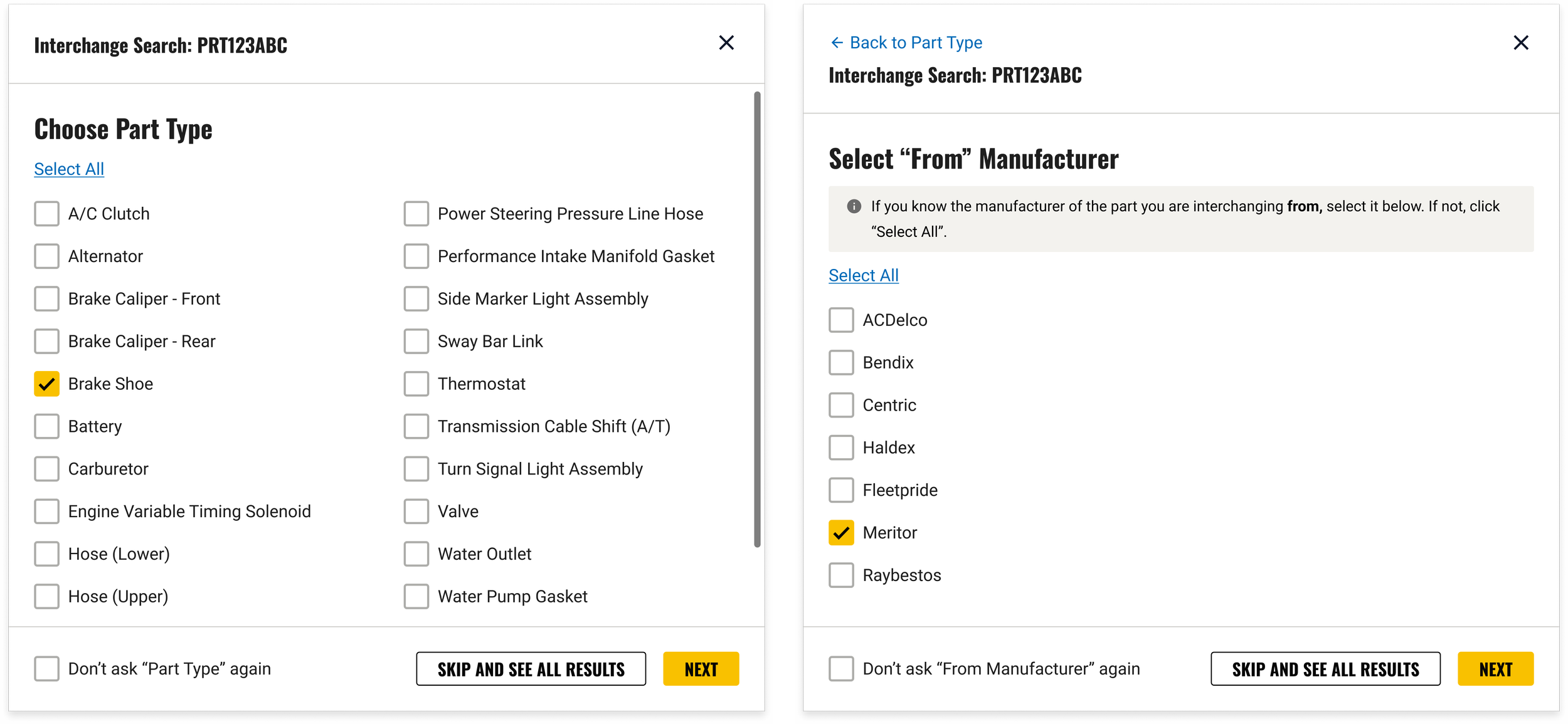
A “filter from” modal
Before running an interchange, users can specify the part type and/or manufacturer of the part they're interchanging from — cutting irrelevant results before they ever appear.
02
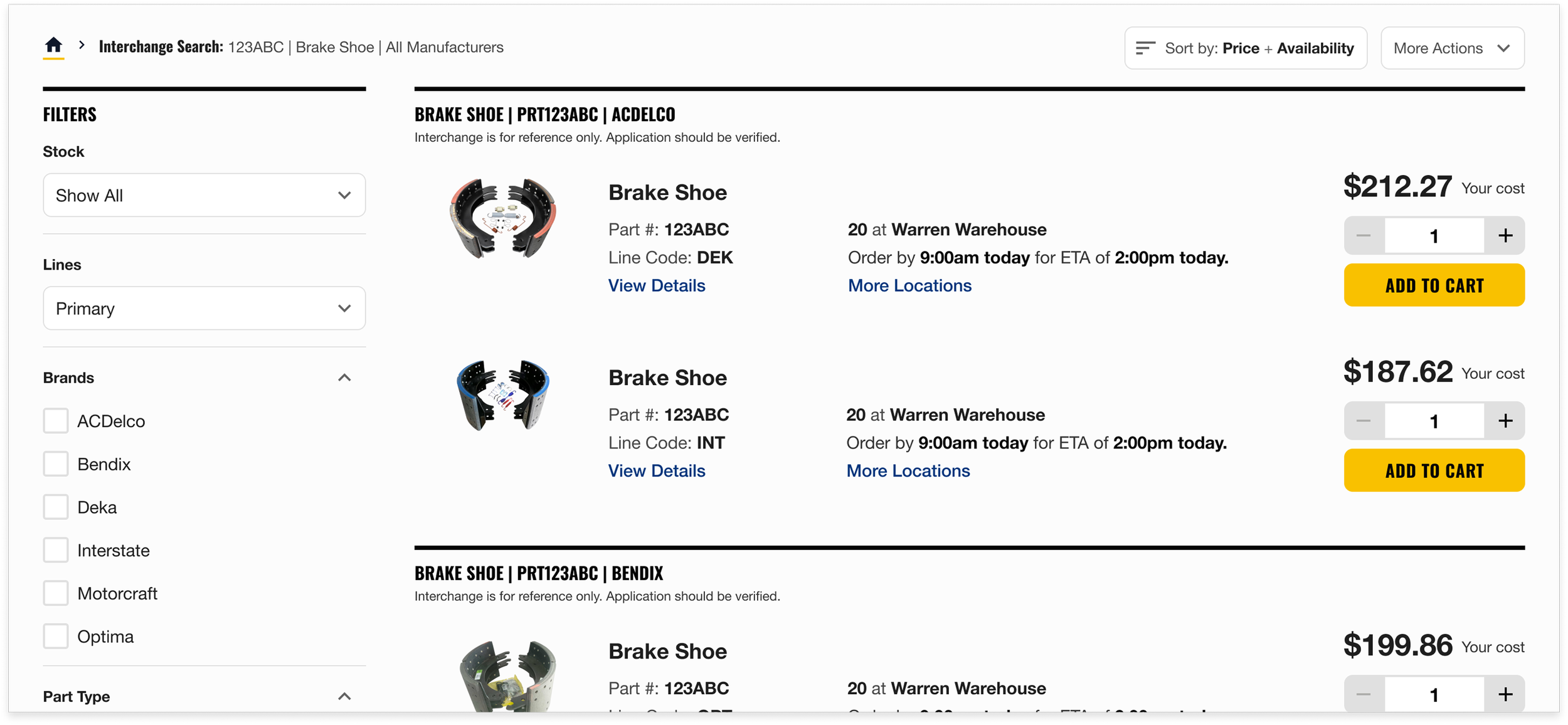
Grouped results
Interchange search results are grouped by part type, part number, and manufacturer, so interchangeable parts sit together instead of scattered through a mixed list.
Evaluative Research
With the designs finalized and client-approved, we ran usability testing to make sure they held up.
We ran five 60-minute sessions, conducted through Zoom. Participants were asked to walk through a series of tasks and provide feedback:
Searching part with known #, type, and manufacturer
Searching part with known #, but unknown type and manufacturer
Searching part with known #, resulting in ‘no results’ cross-reference screen
Searching part with known #, resulting in empty ‘no results’ screen
Adding a vehicle
Through user testing, we validated that our designs were an improvement over the current experience.
01
The modal proved valuable
Users saw clear value in filtering from a known part type and manufacturer — but the language in the “select manufacturer” step wasn't as clear as it could be.
“I like that, it immediately narrows it down. I’m more confident we’re getting closer to the right part”
— Test Participant
02
Grouping was well received
The grouped results on the search page were well received by every user we tested, confirming this was the right direction.
“It’s easy to see what I’m looking at and I can hide groups I don’t need.”
— Test Participant
Responsive Design
After presenting our evaluative findings to AAPA, my research teammate rolled off and I took the project the rest of the way—implementing the feedback we received and presenting the updated designs for a final round of approval.
Once the desktop designs approved by our stakeholders, I produced responsive versions of everything we'd updated so the improved interchange experience holds up whether a mechanic is at a workstation or sourcing a part while on a tablet or phone in the shop.
Handoff & Development
To support handoff, I added detailed annotations in Figma and recorded a video walkthrough for the developers implementing the work.
Once development began, the devs surfaced a problem: our most important improvement — grouped results — depended on data that was slow to load. Basic part info came back quickly, but price and availability were the bottleneck. We knew we had to keep the grouping, so we designed around the limit instead of dropping it.
The fix: load everything we can immediately, then show a loading indicator on the price & availability columns, with overall progress in a floating container in the lower-left. Once results fully load, users can apply their sort preferences — grouping intact.
Outcome
We designed a hi-fidelity prototype grounded in research that reimagined MP4P's interchange search for heavy-duty customers. Along with the desktop designs, we delivered responsive designs for tablet and mobile. To ensure clarity and design fidelity, we provided the engineering team robust design annotations and a video walkthrough of the prototype.